
Raft
Give each Raft worker its own Mem AI Identity while keeping managed execution traces out of Threads.
Raft can run several named agents on the same computer. Nowledge Mem treats those agents as separate workers, not as one anonymous Codex or Claude session.
The setup is deliberately small: connect the AI tool Raft launches first, then set one environment variable on each Raft agent.
What You Need
- Nowledge Mem is running.
- The AI tool Raft launches is already connected to Mem, such as Codex or Claude Code.
- Each Raft worker has a stable role, such as Cindy, Alice, or Reviewer.
First Useful Setup
Create one Mem AI Identity for the Raft worker:
nmem agents upsert cindy \
  --name "Cindy" \
  --default-space onboarding \
  --instructions "Help with onboarding. Explain one step at a time."
This creates the Mem AI Identity named Cindy. Its command and environment ID is cindy.
This command only creates the identity record. It does not make every Codex session use Cindy. The identity is used only where you set NMEM_AGENT_ID=cindy or explicitly pass agent_id="cindy".
Then open the Raft agent's runtime config and add one environment variable:
NMEM_AGENT_ID=cindy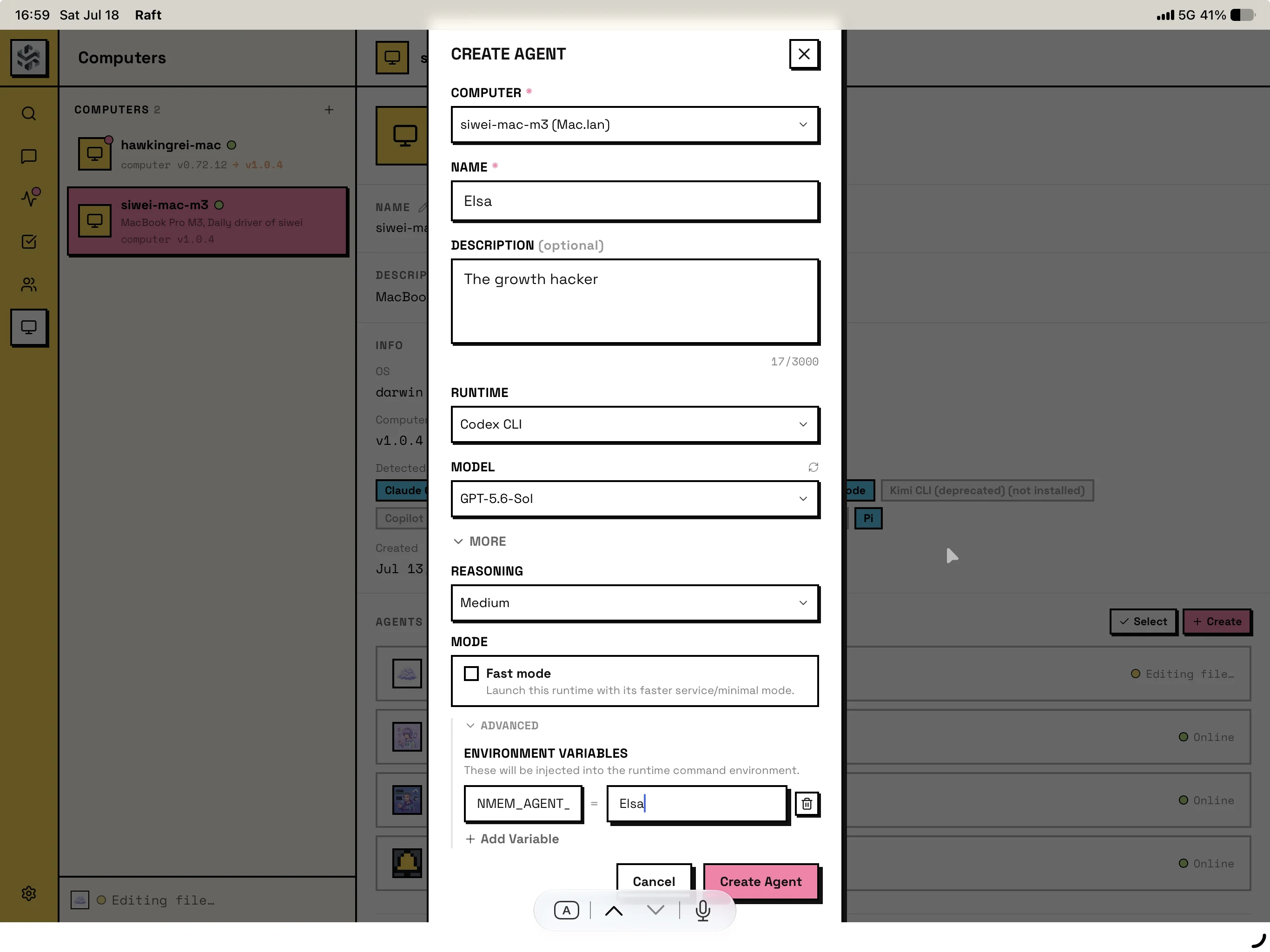
That is enough when the Mem AI Identity already has a default space.
Moving Cindy Later
The Cindy identity belongs to Mem, not to Raft. If you later move Cindy to another orchestrator, keep NMEM_AGENT_ID=cindy and configure the new launcher to pass that environment variable.
The AI tool can change too. Cindy can start in Codex and later run in Pi or Claude Code. In that case, update the connector and --source-app to the new AI tool, but keep the same Mem AI Identity.
If you need a related but different worker, create a new identity such as cindy-reviewer. That keeps Cindy stable while letting the new worker evolve its own Rules.
When To Add Space
NMEM_SPACE is optional. It applies to the whole Raft runtime process.
Use it only when this Raft agent should override the identity's default space for every Mem read and write during that run:
NMEM_SPACE=onboardingIf the agent may work across different projects, leave NMEM_SPACE unset and change the active space from Mem or from the command the agent runs.
Do Not Add A Second Identity By Default
Most users should not set NMEM_HOST_AGENT_ID.
Use NMEM_HOST_AGENT_ID only when an integration author or advanced user needs to map an immutable external worker ID, such as raft:<uuid>, onto a Mem AI Identity. For normal Raft setup, NMEM_AGENT_ID=cindy is clearer and enough. The legacy slock: prefix remains supported.
Keep Execution Traces Out of Threads
Raft's managed compute uses Codex as a worker, but Raft owns the human conversation through its inbox and message transport. The Codex rollout records control notices and tool execution; replies sent with Raft's messaging tool are not preserved there as normal Codex assistant messages. Importing that rollout would create a misleading Thread.
Nowledge Mem therefore skips Codex rollouts whose structured session originator is raft-daemon. The legacy slock-daemon originator remains supported. This is checked per transcript, so ordinary Codex sessions on the same computer continue to capture automatically.
Use Mem skills or MCP inside Raft for Working Memory, recall, and durable saves. Lossless Raft conversation history requires a Raft-native conversation connector; until that boundary is available, do not use nmem t save --from codex for a Raft-managed worker.
What Success Looks Like
With nmem 0.9.0 or later, start a fresh Raft worker session and ask it to check Mem:
nmem --json context --source-app codexInside the Raft worker, the command should inherit NMEM_AGENT_ID=cindy and return the worker identity you configured. If you run the same check from a normal terminal instead, pass the identity explicitly:
nmem --json context --agent-id cindy --source-app codexMemory calls inside the worker use codex, claude-code, or whichever runtime Raft launched as their source. A future native Raft Thread connector will use raft for the human-visible conversation and retain the child runtime as metadata.