
Own Your Knowledge
Your knowledge belongs to you, not your tools. Native integrations, reusable packages, and a morning briefing keep supported AI tools in context.
The Problem
You told Claude Code about your project architecture last week. Today, you're explaining it again to Cursor. Tomorrow, you'll try the new tool everyone's talking about, and start from scratch.
This isn't a memory problem. It's a lock-in problem. Your knowledge is trapped inside whichever tool you used last.
"I already explained this. Why do I have to start over in a different tool?"
The Solution
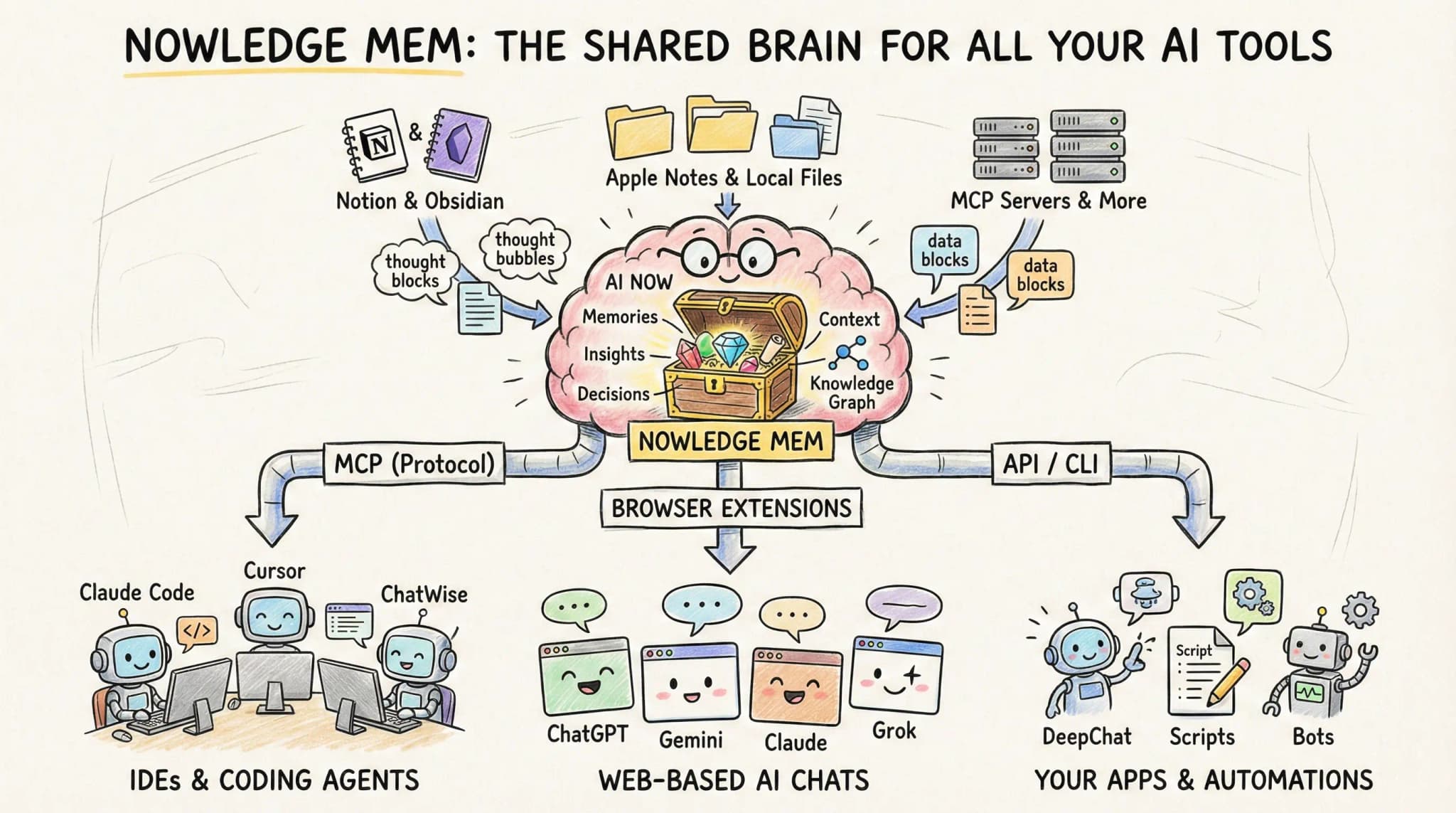
Nowledge Mem is a knowledge layer that sits between you and the AI tools you connect to Mem. It captures your insights automatically, brings sessions and memories back into one searchable system, and writes a daily briefing so supported tools can start with richer context.
Use the setup path that matches your tool. The memory model stays the same.
Your first proof
If this is the problem you want to solve first, save one decision in Mem, connect the tool you use most, then ask a second tool about that same topic later. When it can recall the earlier decision, the loop is working.
How It Works
Connect The Right Way For Each Tool
- Dedicated integrations for Claude Code, Grok Build, Codex, Gemini CLI, OpenClaw, Hermes Agent, Alma, Cursor, Droid, OpenCode, and Copilot CLI give you the best first-time experience.
- Reusable workflow packages cover agent environments that do not have a dedicated package yet.
- Direct MCP remains the fallback when a client has no dedicated package.
For many coding agents, the fastest reusable path is still:
npx skills add nowledge-co/community/nowledge-mem-npx-skillsAfter setup, your agent can read your briefing at session start, search your knowledge mid-task, and preserve durable insights.
Capture Happens Automatically
You don't need to remember to save. Mem captures from multiple channels:
Browser Extension (Exchange v2): The extension monitors your AI chats on supported web AI chat platforms. Insights are captured automatically as you work.
Session Capture and Sync:
Native integrations can capture new coding-agent work where the runtime supports hooks. Local import and nmem t sync backfill older sessions from disk.
Timeline Input: Type a thought, paste a URL, drop a file. For the times you want to save something specific.
Manual Commands:
/sum   -> Summarize this conversation into memories
/save  -> Create the tool's save or handoff action, depending on the integration
Supported Tools Start Informed
Each morning, Background Intelligence writes a Working Memory briefing. Connected tools can load the right briefing for the active space through their own path at session start.
Your agent already knows:
- What you're working on
- Decisions you made recently
- Open questions and contradictions
- How your thinking has evolved
No re-explanation needed. Open Claude Code at 9 AM and it picks up where you left off.
Switch Tools Freely
New tool? Connect it to Mem through the best path it supports. Then it can work from the same shared context.
Example:
You saved: "Architecture decision: Using Redis for session management because..."
Later, in Cursor: "Help me add session handling"
Cursor searches your knowledge, finds the Redis decision, applies the same pattern. No re-explanation needed.
Real Example
Without Nowledge Mem:
You: "Help me implement rate limiting"
Claude: "What kind? Token bucket? Sliding window? What's your use case?"
You: [Explains for the 5th time this month]
With Nowledge Mem:
You: "Help me implement rate limiting"
Claude: [Reads your Working Memory briefing, searches your memories] "Based on your decision last month to use sliding window rate limiting for the payment service, here's an implementation matching your Redis patterns..."
What Gets Connected
| Channel | How It Works | What Gets Captured |
|---|---|---|
| Native integrations | Tool-specific package | Working Memory, recall, distill, and the right save path for that tool |
| Reusable workflow packages | Shared prompts or skills | Working Memory, search, save, distill |
| Browser Extension | Auto-capture from AI chats | Insights from supported web AI chat platforms |
| Session capture and backfill | Native hooks plus local import | Claude Code, Cursor, Codex, OpenCode sessions |
| MCP | Direct protocol connection | Any MCP-compatible tool |
| Claude Desktop | One-click extension | Full integration |
| Built-in | Toggle in settings | DeepChat, LobeHub |
The Compound Effect
A few weeks in, any new tool you connect already knows how you work. Your preferences persist across tools. Your decisions compound. Every insight you've ever saved is available to every tool you'll ever use.
The value lives in Mem, not in any single tool.
Next Steps
- Never Lose a Session -> Auto-sync and backup AI conversations
- Search Through Time -> Find what you knew when
- Connectors -> Connect all your tools