Search Through Time
Find what you knew when, not just what you know now. Bi-temporal search, knowledge evolution tracking, and a timeline slider for your graph.
The Problem
The board asks: "Why did you choose React Native over Flutter in Q1?"
You remember the decision. But you remember it through the lens of everything that happened after: the pivot, the performance issues, the rewrite.
You need to answer: What did you know THEN?
"I can search my notes for 'React Native'. But I can't search for 'what I believed in March about React Native'."
The Solution
Nowledge Mem uses bi-temporal search: two dimensions of time that let you find exactly what you're looking for.
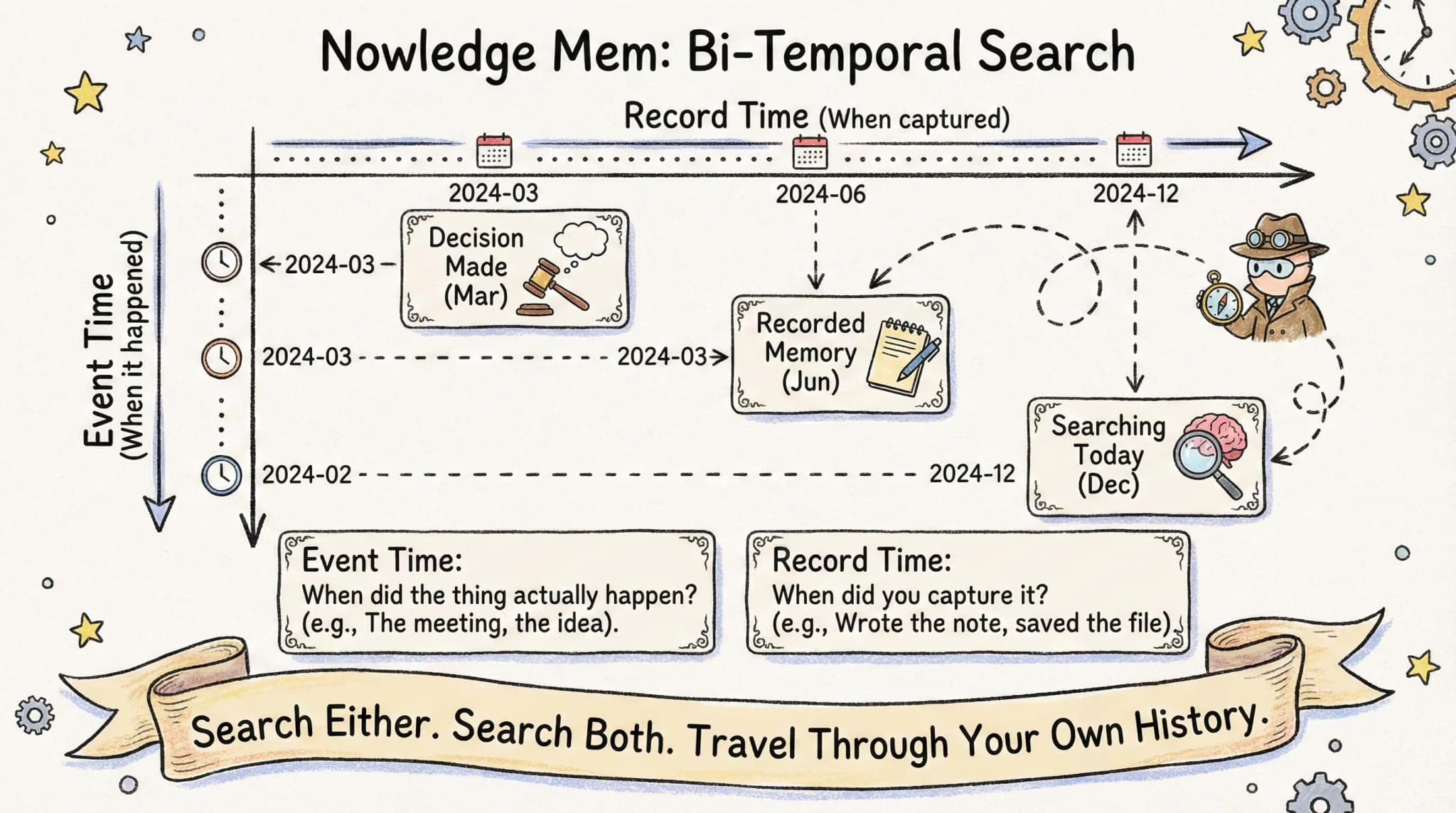
Event Time: When did the thing actually happen? Record Time: When did you capture it?
Search either. Search both. Travel through your own history.
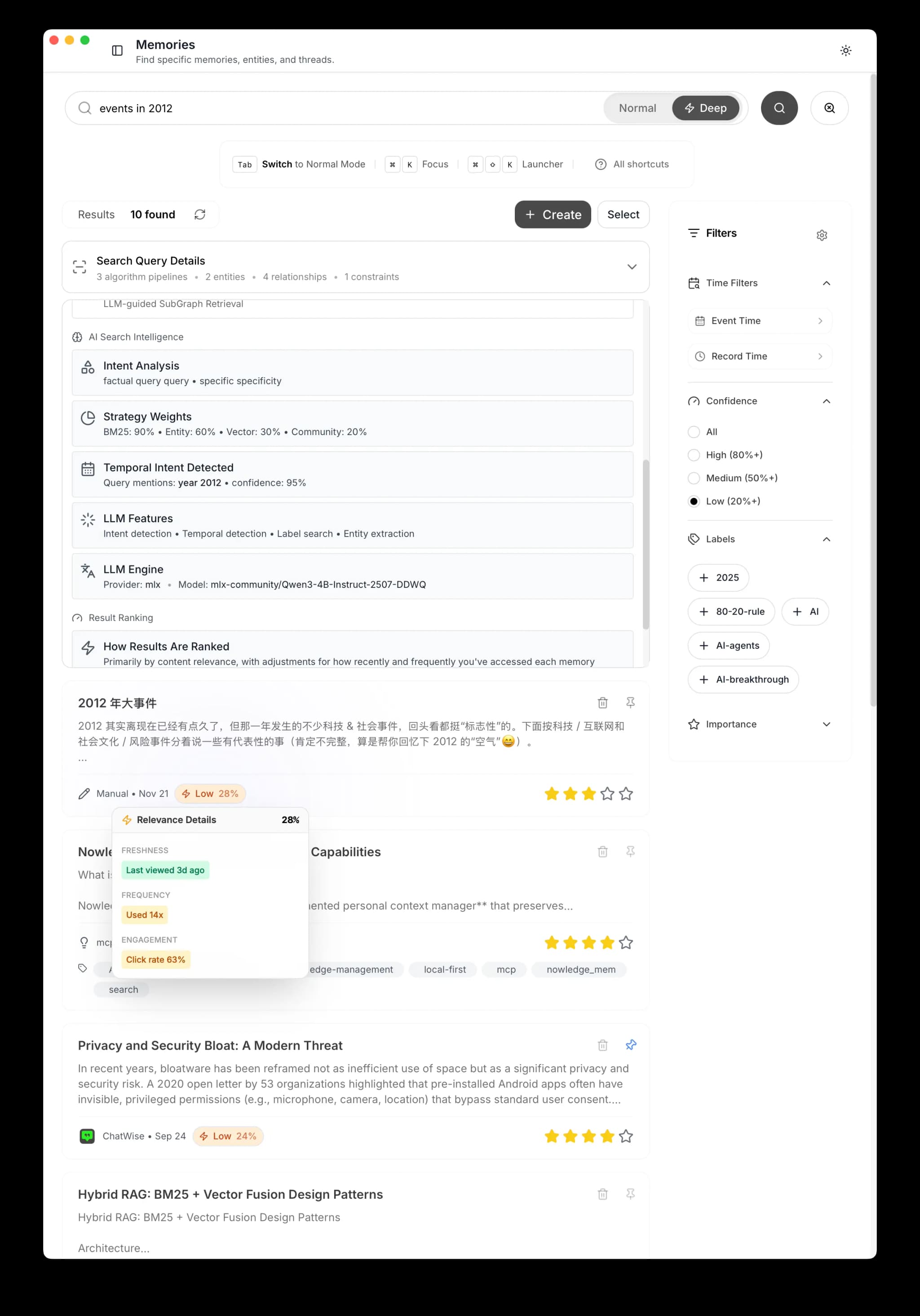
Learn More
Blog: How We Taught Nowledge Mem to Forget.
Documentation about Search & Relevance.
How It Works
Natural Language Queries
Just search naturally. Nowledge Mem understands temporal intent:
"What did I decide about React Native in Q1 2024?"
The system:
- Detects temporal intent: "Q1 2024"
- Searches memories where the event occurred in that period
- Returns results with original context
No special syntax needed.
Explicit Temporal Filters
For precise control, use the advanced search:
| Filter | Meaning | Example |
|---|---|---|
| Event Date From | Event happened after | 2024-01-01 |
| Event Date To | Event happened before | 2024-03-31 |
| Record Date From | Written down after | 2024-01-01 |
| Record Date To | Written down before | 2024-12-31 |
Power Query Example:
Event Time: March 2024 Record Time: Any
Returns: "All memories about events from March 2024, regardless of when you recorded them."
Flexible Date Precision
Nowledge Mem handles flexible dates:
- Year: "2024" -> Matches anything in 2024
- Month: "2024-03" -> Matches March 2024
- Day: "2024-03-15" -> Matches that specific day
The system preserves your original precision and displays accordingly.
Knowledge Evolution
Bi-temporal search gets even more powerful with Knowledge Evolution. Background Intelligence automatically detects when your thinking on a topic changes:
Tuesday: You save "Using PostgreSQL for the new service." Thursday: You mention CockroachDB as a migration target. Friday: Background Intelligence links them with an EVOLVES relationship and flags the tension.
Now when you search "database decisions," you don't just get isolated memories. You get the evolution chain: the original decision, the update, and the relationship between them. You can see exactly how your thinking shifted and when.
Evolution types:
- Replaces: Newer information makes older obsolete
- Enriches: Newer adds detail to older
- Confirms: Same conclusion from a different source
- Challenges: Contradictory information flagged for review
Real Examples
Board Retrospective
Query: "architecture decisions in Q1 2024"
Result: Original decision memos with Q1 context, plus evolution chains showing how decisions changed after
Compliance Audit
Query: "security policies before the incident"
Result: What policies existed before the breach, with record timestamps proving when they were documented
Project Post-Mortem
Query: "project-x assumptions from kickoff"
Result: Original assumptions that turned out wrong, linked to the later insights that proved them wrong
Knowledge Graph + Time
Your graph view has a timeline slider that filters nodes and edges by date range.
Set the range to "March 2024" and see:
- Only entities that existed then
- Only connections that were known then
- The state of your knowledge at that moment
Drag the slider forward and watch your understanding evolve. Play the animation to see knowledge accumulate over time.
How Memory Decay Works
Not all memories age equally. Like your brain, Nowledge Mem:
- Prioritizes recent memories by default (30-day half-life)
- Boosts frequently accessed memories (logarithmic scaling)
- Respects importance scores you set (importance floor prevents full decay)
- Learns from your behavior (clicks, dwell time)
This means casual searches surface fresh, relevant results, but temporal searches bypass decay to find exactly what you asked for.
Deep Mode
Temporal intent detection requires Deep Mode search. In Fast Mode, temporal references are matched by keywords only. Enable Deep Mode for queries like "recently working on" or "decisions from last quarter."
See Search & Relevance for the full technical breakdown of how scoring, decay, and temporal matching work.
The Two Times
Understanding the difference is key:
| Question | Which Time? |
|---|---|
| "What did I decide in March?" | Event Time |
| "What did I write last week?" | Record Time |
| "Show recent notes about old events" | Both |
| "What did I know before the pivot?" | Event Time |
Most searches use event time because you're asking about when things happened.
Record time is useful for:
- Finding recent captures
- Reviewing what you've been documenting
- Auditing when knowledge was recorded
Why This Matters
Traditional search finds content. Temporal search finds context. Knowledge Evolution finds the story.
"We didn't make a bad decision. We made the best decision with what we knew. Here's the proof. And here's exactly when and why our thinking changed."
Your memories are time-stamped, version-controlled, and historically accurate.
Next Steps
- Own Your Knowledge -> Use any tool without losing context
- See Your Expertise -> Visualize your knowledge
- Background Intelligence -> Knowledge graph capabilities