
See Your Expertise
Your knowledge graph builds itself. Background Intelligence extracts entities, detects communities, and tracks how your expertise evolves over time.
The Problem
You've been learning for years. Building expertise. Accumulating knowledge.
But can you see it?
I know I'm good at... stuff. Technical stuff. But if someone asked me to describe my expertise, I'd struggle. It's all intuition. Nothing concrete.
Your knowledge is invisible. Scattered across memories, notes, conversations. You can't see the patterns. The connections. The clusters of expertise.
The Solution
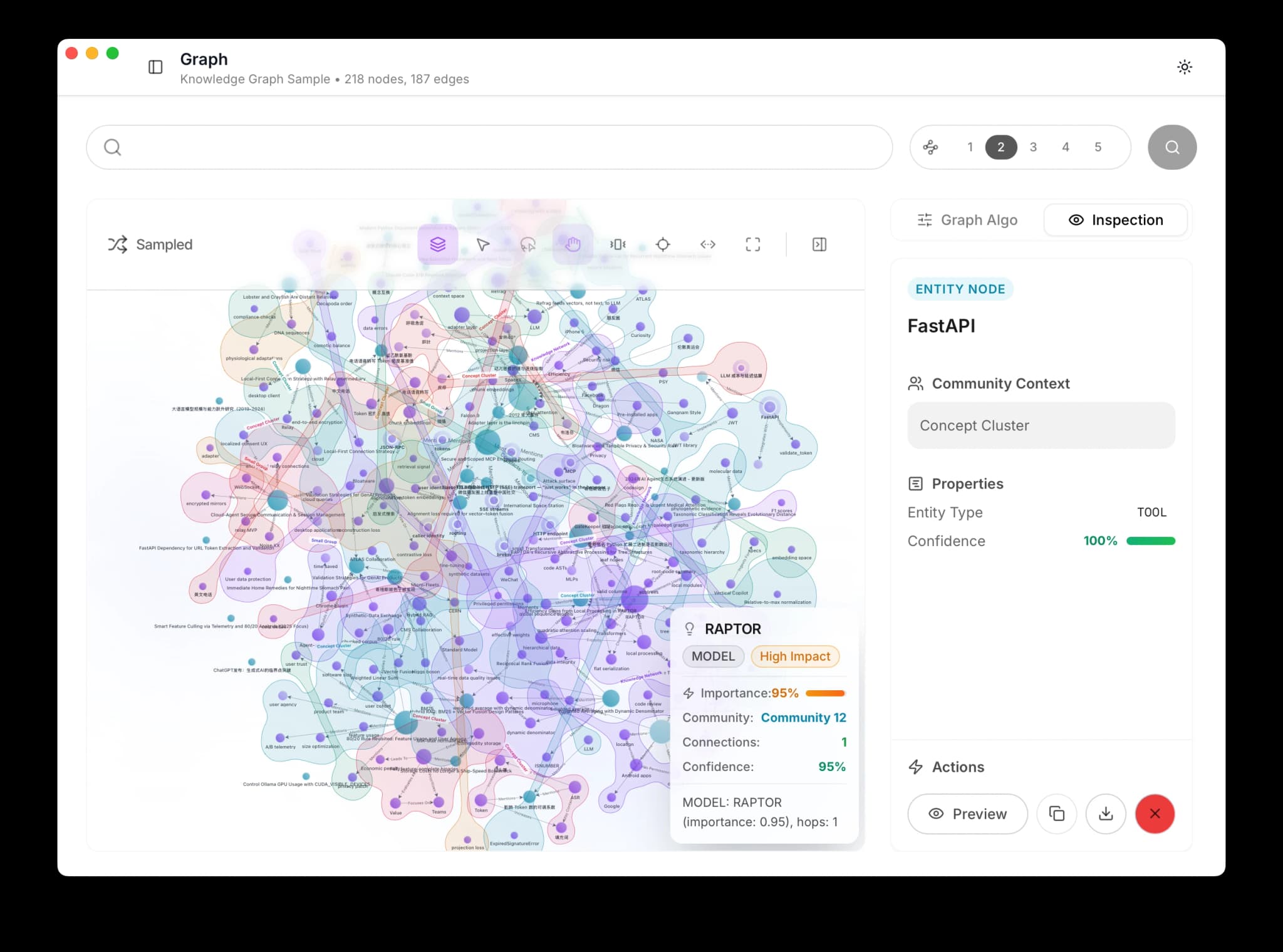
Nowledge Mem visualizes your knowledge as a living graph. Nodes are your memories and entities. Edges are relationships. And the graph builds itself: Background Intelligence automatically extracts entities and relationships from your memories overnight.
Run community detection and watch your expertise clusters emerge:
How It Works
The Graph Builds Itself
You don't need to manually tag or categorize anything. Background Intelligence reads your memories and extracts:
- Entities: Technologies, people, concepts, projects
- Relationships: How they connect to each other
- Evolution chains: How your thinking on a topic has changed
This happens automatically. Save memories through any channel (auto-sync, browser extension, Timeline, /sum) and the graph grows on its own.
Requirements
Automatic entity extraction requires a configured Remote LLM and the appropriate license for your build.
Run Community Detection
In the right panel, find Graph Algo and click Compute under Clustering.
The Louvain algorithm analyzes your knowledge structure and finds natural clusters:
| Community | Size | Theme |
|---|---|---|
| Distributed Systems | 87 memories | Backend architecture, scaling |
| Team Leadership | 45 memories | Mentoring, communication |
| Performance | 62 memories | Optimization, profiling |
| Side Projects | 23 memories | Creative experiments |
Each cluster gets a colored "bubble" around its nodes.
Travel Through Time
The timeline slider at the bottom of the graph lets you filter by date range.
Drag to "January 2024" and see your knowledge at that point. Drag forward and watch new clusters form, existing ones grow, and connections multiply.
Play the animation to watch your expertise evolve over months. See when a new interest emerged, when it connected to existing knowledge, and when it grew into a full cluster.
Explore and Discover
Navigate the graph:
- Click any node to see its details
- Double-click to expand neighbors
- Shift+drag to lasso-select multiple nodes
- Press C to toggle community bubbles
- Press E to expand selected node's neighbors
Find patterns you never noticed:
Every leadership memory links back to debugging sessions. I lead by teaching debugging.
What You'll Discover
Expertise Clusters
Community detection reveals where your knowledge naturally groups:
- Core strengths: Large, dense clusters
- Emerging areas: Small but growing clusters
- Bridges: Nodes that connect multiple clusters (often your most unique skills)
Knowledge Evolution
Background Intelligence tracks how your thinking changes:
- Tuesday: "Using PostgreSQL for the new service"
- Thursday: "Considering CockroachDB for migration"
- Friday briefing: "Your database thinking is evolving"
These evolution chains appear as linked nodes in the graph. You can see exactly where your opinions shifted and follow the trail.
Hidden Patterns
Explore and find:
- Recurring themes you never consciously tracked
- Connections between seemingly unrelated projects
- Your unique perspective and approach
- Gaps between related topics
Asking AI About Your Graph
With your graph in view, ask AI Now to interpret it:
Based on my knowledge graph, what career paths fit me best?
AI Now synthesizes:
Your memories show a unique intersection of deep systems knowledge with teaching ability. Your most central concepts (event-driven architecture, debugging) connect to both technical and leadership clusters. Consider: Staff Engineer, Developer Advocate, or Engineering Manager with technical focus.
Other questions to try:
- "What are my strongest expertise areas?"
- "Where are the gaps in my knowledge?"
- "What topics should I explore next?"
- "How has my focus shifted over time?"
The Compound Effect
More memories = richer graph = deeper insights.
After 1 month:
I can see my main topics, but clusters are small
After 6 months:
Clear expertise areas. Unexpected connections emerging. Background Intelligence is finding patterns I missed.
After 1 year:
I can literally see how my thinking has evolved. The connections I made last year laid groundwork for this year.
For performance reviews:
I explored my graph before the review. Had concrete examples of growth across every dimension.
Next Steps
- Background Intelligence -> How the graph grows automatically
- Own Your Knowledge -> Use any tool without losing context
- Search Through Time -> Temporal queries and evolution chains