
OpenClaw × Nowledge Mem
Set up OpenClaw with lossless session memory and shared cross-tool memory in 5 minutes.
For your agent
Give this line to your agent. It should use the universal install skill first; this page remains the behavior and troubleshooting reference:
Read https://mem.nowledge.co/SKILL.md and follow the instructions to install or update Nowledge Mem for OpenClaw. Verify with nmem status and the Context Bundle or Working Memory check, then summarize what changed.openclaw plugins install clawhub:@nowledge/openclaw-nowledge-memConfigure the plugin and the conversations you have with OpenClaw land in Mem as searchable threads. Background cron-style runs do not. Mem can still distill what matters into linked memories, and what you saved in other tools, documents, or imports stays available to the agent. Local-first by default; add apiUrl and an optional apiKey if you use a shared server.
Behind that, Nowledge Mem is doing more than storing notes. It links related knowledge into a graph, tracks how ideas evolve, and can keep processing in the background so OpenClaw can benefit from daily briefings, contradiction checks, and crystals built from multiple sources.
Your first success state
The fastest proof is simple: remember one fact, recall it in a fresh session, then confirm the session itself shows up as a searchable thread.
Published on ClawHub
The package is now published on ClawHub. Use the explicit clawhub: install form when you want to make the source clear. Bare package names still work because OpenClaw resolves ClawHub before npm.
Before You Start
You need:
- Nowledge Mem running locally (installation)
- OpenClaw 2026.5.3 or later (OpenClaw getting started). Older 2026.4.x builds can reject current ClawHub packages with an archive integrity mismatch before the plugin is installed.
nmemCLI on your PATH. In Nowledge Mem, go to Settings → Preferences → Developer Tools → Install CLI. Or install standalone:pip install nmem-cli
nmem status        # should show Nowledge Mem is running
openclaw --version
Setup
Install the plugin
openclaw plugins install clawhub:@nowledge/openclaw-nowledge-memThe installer enables the plugin and switches OpenClaw's memory slot to openclaw-nowledge-mem automatically. On current OpenClaw builds, that same install flow may also set plugins.slots.contextEngine to openclaw-nowledge-mem. Plugin 0.8.18+ accepts that automatically as a compatibility alias.
Current OpenClaw releases require an explicit grant before a non-bundled plugin can read the agent_end conversation used as the thread-sync safety net:
openclaw config set plugins.entries.openclaw-nowledge-mem.hooks.allowConversationAccess true --strict-jsonNext, run openclaw config get tools. If you use a restrictive profile such as coding, preserve any existing tools.alsoAllow entries and add openclaw-nowledge-mem. If tools.allow already exists, add the plugin id to that list instead. Do not replace an existing list or enumerate individual nowledge_mem_* tools; the plugin id grants the complete manifest-declared contract.
If an earlier ClawHub install was blocked with dangerous code patterns detected,
update to 0.8.17+. That release removes test-only files from the published
plugin artifact, so OpenClaw only scans real runtime code during install.
If you prefer the default resolver path, this also works:
openclaw plugins install @nowledge/openclaw-nowledge-memTo update to the latest version:
openclaw plugins install clawhub:@nowledge/openclaw-nowledge-mem --forceThis refreshes the plugin from ClawHub and replaces the installed copy. Use it
instead of openclaw plugins update openclaw-nowledge-mem if your local
OpenClaw install was previously pinned to a specific plugin version.
If OpenClaw reports archive integrity mismatch during install, update
OpenClaw first, then run the same --force install command again.
Customize Safely
OpenClaw does not use a separate project instruction file for this plugin.
- Use the plugin settings and OpenClaw config for durable behavior changes
- Use your agent or prompt configuration when you want different memory style, language, or recall policy
- Do not patch installed plugin source under
~/.openclaw/extensions/
For the full host-by-host map, see Customize Integration Behavior.
Pin trust for non-bundled plugins (recommended)
If OpenClaw warns that plugins.allow is empty, add this:
{
  "plugins": {
    "allow": ["openclaw-nowledge-mem"]
  }
}
If you also use linked or workspace copies, review plugins.load.paths too. OpenClaw allowlists plugin ids, not install provenance.
Restart OpenClaw and verify
openclaw nowledge-mem statusIf Nowledge Mem is reachable, you're done.
If you manage OpenClaw config manually instead of using openclaw plugins install, make sure plugins.slots.memory is openclaw-nowledge-mem and plugins.entries.openclaw-nowledge-mem.enabled is true.
For local mode, no API key is needed. If you are connecting to a remote Nowledge Mem server instead, set apiUrl, and add apiKey when that server has auth enabled.
Spaces
OpenClaw can keep one ambient memory lane per profile or process.
- Use
NMEM_SPACE="Research Agent"when one OpenClaw process already belongs to one lane. - Or set plugin config
spacefor one fixed lane in the OpenClaw UI. - Use
spaceTemplateonly when your launcher already exports a trustworthy lane variable such as${OPENCLAW_AGENT_NAME}.
If the runtime does not expose agent identity cleanly, do not fake per-agent mapping. Use one profile per lane or stay on Default.
Verify It Works (1 Minute)
In OpenClaw chat:
/remember We chose PostgreSQL for task events/recall PostgreSQL: should find it immediately/new: start a fresh session- Ask:
What database did we choose for task events?: it remembers across sessions - Ask:
What was I working on this week?: weekly activity view - Ask:
What was I doing on February 17?: down to the exact day /forget PostgreSQL task events: clean deletion
If all seven steps work, the memory system is fully running.
What You Can Do
Your chats stay. Automation does not.
Talk in OpenClaw and those turns save as threads you can search later. The plugin skips automation sessions such as cron-worker, so the list stays readable. When something in a session is worth keeping, Mem can distill it into structured memories and point back to the chat with sourceThreadId.
Use graph-based memory, not a flat archive
Memories are linked to related entities, earlier and later versions of the same idea, and the source conversations they came from. That means OpenClaw can do more than keyword recall. It can trace how a decision changed, follow connected topics, and explain where an answer came from.
Let knowledge improve in the background
When Background Intelligence is enabled in Nowledge Mem, the system keeps working after the session ends: deduplicating overlap, surfacing contradictions, writing Working Memory briefings, and creating crystals when several memories converge into something worth keeping. OpenClaw can read those outputs the next time you work.
Remember anything, forever
Tell the AI /remember We decided against microservices, the team is too small. Next week, in a different session, ask "what was that decision about microservices?" It finds it.
Browse your work by date
Ask "what was I doing last Tuesday?" and the AI lists everything you saved, documents you added, and insights generated that day. You can ask for a specific date, not just "the past N days."
Bring the rest of your AI work into OpenClaw
What you learned in Claude, decided in Cursor, captured from browser chats, or imported from past threads can all become part of the same memory layer. OpenClaw is not an island. It is one connected path in a larger system.
Trace a decision's history
Ask the AI "how did this idea develop?" and it shows you: the original source documents that informed it, which related memories were synthesized into a higher-level insight, and how your understanding changed over time.
Optional: start every session already in context
If you enable sessionContext, Context Bundle / Working Memory and relevant memories are injected before the first response. That gives OpenClaw immediate context from turn one. In the default mode, the agent still gets memory tools and a short system hint, but it decides when to search.
Save knowledge with structure, not just text
When you ask the AI to remember something, it doesn't just store text. It records the type (decision, learning, preference, plan...), when it happened, and links it to related knowledge. Searching by type, by date, by topic all work because the structure is there.
Trace a memory to its source conversation
When a memory was distilled from a conversation, it includes a sourceThreadId. The agent can fetch the full conversation with nowledge_mem_thread_fetch to see the complete context: what was said, what was decided, and how the conclusion was reached.
Search past conversations directly
Ask "find the conversation where we discussed Redis caching" and the agent uses nowledge_mem_thread_search to find matching threads with message snippets. Then fetch full messages with nowledge_mem_thread_fetch for progressive retrieval of long conversations.
Slash commands: /remember, /recall, /forget
How It Works
Per-turn flow
Every time you send a message, the plugin injects behavioral guidance before the agent processes it. The agent then decides which tools to call.
The behavioral skill and always-on hook nudge the agent to search before answering and save after deciding. Here's when each tool fires:
| Scenario | Tool | What happens |
|---|---|---|
| User asks a question | memory_search | Search knowledge base before answering. Returns sourceThreadId when available. |
| Decision made, insight learned | nowledge_mem_save | Structured save: type + labels + temporal context. |
| "What was I doing last week?" | nowledge_mem_timeline | Activity feed grouped by day. Supports exact date ranges. |
| "How is X connected to Y?" | nowledge_mem_connections | Graph walk: edges, entities, EVOLVES chains, provenance. |
| Need startup context or today's focus/priorities | nowledge_mem_context | Read Context Bundle when available, with Working Memory fallback. |
Memory has sourceThreadId | nowledge_mem_thread_fetch | Fetch full source conversation with pagination. |
| "Find our discussion about X" | nowledge_mem_thread_search | Search past conversations by keyword. |
| "Forget X" | nowledge_mem_forget | Delete by ID or search query. |
| "Is my setup working?" | nowledge_mem_status | Show config, connectivity, and version. |
Session lifecycle (automatic capture)
When sessions end, conversations are automatically captured and optionally distilled into structured memories.
Key points:
- Sessions where you are really chatting in OpenClaw are saved automatically. They show up in Mem like threads from other assistants.
- Isolated cron or other automation sessions are not captured. OpenClaw gives them separate keys; you might notice
cron-workerin diagnostics. Leaving them out of Threads is deliberate. - Distillation runs when the transcript grows on a normal path (
agent_end, or each Context Engine turn). A compaction-only checkpoint does not, by itself, trigger a new distill pass. - If you enable the Context Engine, prompt assembly moves there, but thread capture still keeps the lifecycle hooks as a backstop. That makes session sync more resilient without creating duplicate threads.
- Distilled memories include
sourceThreadIdso you can open the source conversation.
Progressive retrieval (memory to thread to messages)
Memories distilled from conversations carry a sourceThreadId. This creates a chain: search memories, trace to source conversation, read full messages with pagination.
Two entry points into past conversations:
- From a memory:
memory_searchormemory_getreturnssourceThreadId, then fetch the source conversation - Direct search:
nowledge_mem_thread_searchfinds conversations by keyword, then fetch any match
Three modes
The plugin supports three operating modes. Choose based on how much you want to guarantee versus how much token budget you're willing to spend.
| Mode | Config | Behavior | Token cost |
|---|---|---|---|
| Default (recommended) | sessionContext: false | Agent calls 10 tools on demand. Conversations captured + distilled at session end. | Lowest overhead. The agent decides when to search. |
| Session context | sessionContext: true | Context Bundle / Working Memory + relevant memories injected at prompt time, plus all 10 tools still available. | Higher per-turn context cost, but context is present from turn one. |
| Minimal | sessionDigest: false | Tool-only, no automatic capture. | Small overhead from the always-on system hint only. |
Which mode should you use?
- Most users: start with default. The agent gets behavioral guidance nudging it to search before answering and save after deciding. It works well for most conversations.
- Short sessions or critical accuracy: enable
sessionContext. This guarantees relevant memories are present from the first turn. The agent doesn't need to decide whether to search. The tradeoff is a larger prompt on each turn. - Full manual control: set
sessionDigest: false. You control what gets saved (via/rememberornowledge_mem_save) and nothing is captured automatically.
sessionContext - Automatic context injection
When enabled, the plugin injects context at prompt time:
- Reads Context Bundle when available: owner identity, agent identity, active space, Rules, Working Memory, and KFS paths. Older
nmemclients fall back to Working Memory. - Searches your knowledge graph for memories relevant to your current prompt
- Appends the recalled material as run-specific context in system-prompt space, so the stable prefix stays cached and token costs stay low
The behavioral guidance automatically adjusts when sessionContext is on. It tells the agent that context has already been injected, so memory_search should only be used for specific follow-up queries, not broad recall. This prevents redundant searches for the same context.
Useful for giving the agent immediate context without waiting for it to search proactively. Best for short sessions and critical workflows where you want guaranteed recall.
sessionDigest - Thread capture + LLM distillation (default: on)
On by default. Two things happen at session lifecycle events (agent_end, after_compaction, before_reset):
1. Thread capture (interactive sessions). The full chat is appended to a Mem thread and stays searchable with nowledge_mem_thread_search. Cron and other isolated automation use different session keys; the plugin skips them so scheduled runs do not sit next to the conversations you started yourself.
2. LLM distillation (when worthwhile). After thread capture, a lightweight LLM triage determines if the conversation contains save-worthy content (decisions, insights, preferences). If yes, a full distillation pass extracts structured memories with proper types, labels, and temporal data. Works in any language.
Context compaction: when OpenClaw compresses a long conversation, the plugin captures the transcript first. Nothing is lost.
Deduplication: thread appends are idempotent by message ID. No duplicates.
Common Questions
Does the agent always search before answering?
The plugin uses two layers to drive recall. First, a behavioral skill (auto-discovered by OpenClaw) teaches the agent when and how to use memory tools. Second, a short always-on system hint reminds it to search before answering questions about prior work, decisions, or preferences. In practice, modern LLMs follow this directive guidance reliably for knowledge-related questions. For messages that don't need past context, the agent skips the search, which is the right tradeoff. If guaranteed recall matters for your use case, enable sessionContext: true. That injects relevant memories at prompt time, before the agent processes your message.
What stops the agent from saving the same thing twice?
Two layers. First, the plugin checks for near-identical existing memories before every save. If a memory with very high similarity already exists, the save is skipped and the existing memory is returned instead. Second, Nowledge Mem's Background Intelligence runs in the background and handles deeper deduplication, identifying semantic overlap across memories and linking them via EVOLVES chains (replaces, enriches, confirms, or challenges). The plugin catches obvious duplicates; Background Intelligence catches subtle ones.
What happens to conversations I don't explicitly save?
With sessionDigest on (the default), chats you have in OpenClaw are stored as searchable threads. The boundary follows OpenClaw's own session lifecycle: one active chat becomes one Mem thread, /new or /reset starts a fresh thread, and transcript rotation during compaction stays inside the same thread. Context Engine capture and hook-based capture still converge on the same conversation. Helper sessions such as temp:* and subagent runs are filtered out, so your recent threads stay focused on real chats. Find them later with nowledge_mem_thread_search. A small LLM pass may promote a rich session into structured memories; casual small talk usually stops at the thread. Cron runs never enter this path.
Can memories become outdated?
Yes, and that's by design. Nowledge Mem's EVOLVES chains track how understanding changes: a newer memory can supersede, enrich, or challenge an older one. Background Intelligence identifies these relationships automatically. When you search, the relevance scoring considers recency, so newer memories rank higher by default.
Configuration
No config is needed for a normal npm install. The installer already enables the plugin and selects the memory slot.
To change settings, open the OpenClaw dashboard and go to Automation > Plugins. Under Plugin Entries, expand Nowledge Mem, then Nowledge Mem Config. You can also type "nowledge" in the search bar to jump straight there.
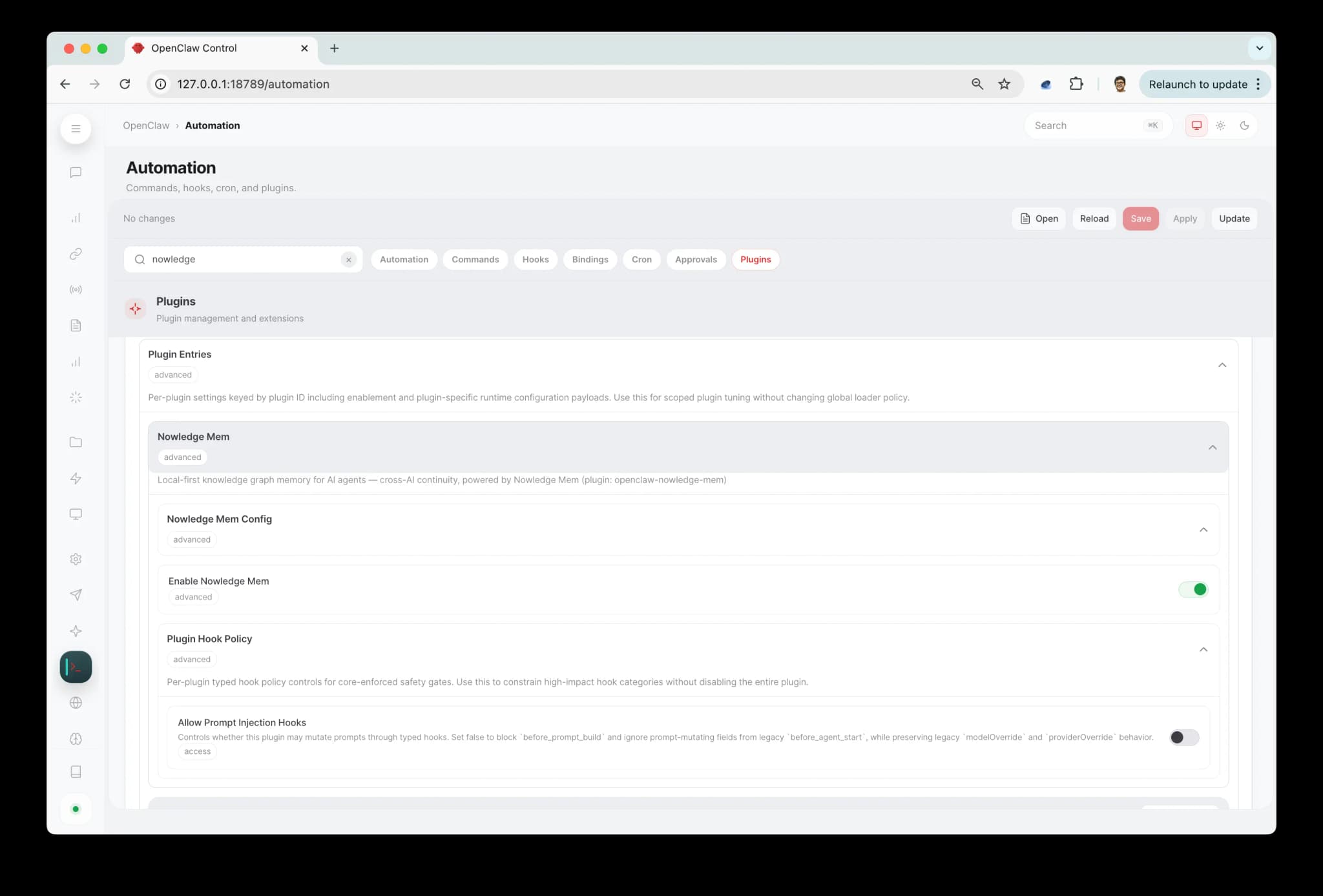
Changes take effect after restarting OpenClaw.
| Setting | Default | What it does |
|---|---|---|
| Session context injection | off | Inject Context Bundle / Working Memory + relevant memories at prompt time |
| Session digest at end | on | Capture conversations + distill key memories at session end |
| Minimum digest interval | 300s | Seconds between session digests (0 = no limit) |
| Max context results | 5 | Memories to inject at prompt time (1-20) |
| Min recall score | 0 | Only inject memories scoring above this threshold (0-100%). 0 includes all results. |
| Max thread message chars | 800 | Characters kept per captured thread message (200-20000). Raise for long code or technical conversations. |
| Corpus supplement | off | Feed your knowledge into OpenClaw's dreaming system (see below) |
| Corpus max results | 5 | Max results per dreaming search (1-20) |
| Corpus min score | 0 | Min score for dreaming results (0-100%). 0 includes all. |
| Dreaming | managed by OpenClaw | Optional OpenClaw dreaming settings. When Nowledge Mem owns the memory slot, OpenClaw may store its native dreaming object here. memory-core still runs the dreaming engine. |
| Server URL | empty | Remote server URL (empty = local) |
| API key | empty | API key for remote access |
Remote access
To connect to a Nowledge Mem server on another machine, configure this machine once:
nmem config client set url https://<your-url>
nmem config client set api-key nmem_...
That writes the shared local client config used by nmem, OpenClaw, Bub, Claude Code, and other integrations on this machine. You can also set Server URL and API key in the OpenClaw dashboard plugin settings. The same resolved credentials are used everywhere in the plugin: CLI-backed memory tools and API-backed thread sync both follow the same apiUrl and apiKey. The API key never appears in logs or command history. See Access Mem Anywhere.
Troubleshooting
Plugin is installed but OpenClaw isn't using it
Check that plugins.slots.memory is exactly openclaw-nowledge-mem, and that you restarted OpenClaw after editing the config.
plugins.allow is empty warning
This means OpenClaw found a non-bundled plugin without an explicit allowlist entry yet. If this is your npm-installed plugin, add:
{
  "plugins": {
    "allow": ["openclaw-nowledge-mem"]
  }
}
If you also use plugins.load.paths or linked workspace copies, review those paths too. OpenClaw allowlists ids, not install provenance.
"Duplicate plugin id detected" warning
This happens if you previously installed the plugin locally (e.g. with --link) and then installed from npm. OpenClaw is loading it from both places. Fix it by removing the local path from your config:
Open ~/.openclaw/openclaw.json and delete the plugins.load.paths entry that points to the local plugin directory:
"load": {
  "paths": []
}
Then restart OpenClaw. The warning will be gone and only the npm-installed version will load.
Status shows not responding
nmem status
curl -sS http://127.0.0.1:14242/health
Memory tools work, but the session itself does not show up in Threads
Run nowledge_mem_status inside a normal chat session and confirm:
sessionDigestis still on- the backend is reachable
- which capture route is active
- whether you changed plugin settings recently without restarting OpenClaw yet
If you enabled plugins.slots.contextEngine: "nowledge-mem", plugin 0.8.6+ keeps lifecycle hooks as a safety net for thread sync. On current OpenClaw installer builds, plugins.slots.contextEngine may instead be openclaw-nowledge-mem; plugin 0.8.18+ treats that as the same engine. On 0.8.5 and earlier, a useful isolation step is to remove the contextEngine slot temporarily, restart OpenClaw, and see whether thread capture returns on the hook-only path.
If threads stopped updating right after an OpenClaw upgrade, update the Nowledge Mem plugin and restart OpenClaw. Plugin 0.8.24+ handles newer per-turn capture events from OpenClaw's Codex runtime. Plugin 0.8.27+ is also required for OpenClaw builds that log must declare contracts.tools before registering agent tools; that error means OpenClaw rejected the plugin's tools before capture hooks could run.
OpenClaw 2026.6.11 emits numeric message timestamps. Plugin 0.8.30+ converts them to the textual timestamp contract used by Mem Threads. It also reports when OpenClaw is blocking the agent_end fallback. Grant access and restart after upgrading:
openclaw config set plugins.entries.openclaw-nowledge-mem.hooks.allowConversationAccess true --strict-json
openclaw gateway restart
OpenClaw applies plugin setting changes after restart. If sessionDigest was turned off earlier but OpenClaw had not restarted yet, thread sync could appear to keep working until the next restart, then stop.
Healthy OpenClaw thread sync looks like this:
- one active OpenClaw chat becomes one Mem thread
- running
/newor/resetstarts a fresh Mem thread - compaction does not fork a second thread for the same chat
- helper sessions like
temp:slug-generatordo not appear - the synthetic
/new//resetstartup prompt is not saved as the first user message
To inspect the recent synced threads directly:
nmem t list --source openclaw -n 20Only memory_search and memory_get work, saves go to local files
First run openclaw config get tools. If a restrictive profile such as coding is active, preserve its policy and add openclaw-nowledge-mem to tools.alsoAllow; if tools.allow already exists, add the plugin id there. Then check the memory slot. OpenClaw 3.22+ defaults the memory slot to memory-core when no explicit slot is configured, so a manual install or upgrade can require the slot to be set again.
Verify your config has the explicit slot:
{
  "plugins": {
    "slots": { "memory": "openclaw-nowledge-mem" }
  }
}
Or reinstall, which sets the slot automatically:
openclaw plugins install clawhub:@nowledge/openclaw-nowledge-memRestart OpenClaw after either change.
Plugin tools not available
Plugin trust and tool policy are separate gates. Make sure the plugin is in plugins.allow:
{
  "plugins": {
    "allow": ["openclaw-nowledge-mem"]
  }
}
Then inspect openclaw config get tools. A restrictive profile needs openclaw-nowledge-mem in tools.alsoAllow, unless an explicit tools.allow already exists, in which case add the plugin id there. Preserve existing entries. Do not list individual nowledge_mem_* names: using the plugin id keeps the granted surface aligned with the manifest.
Search is slow with many concurrent agents
When running many agents in parallel (10+), search performance can degrade because all operations share a single database connection. Recommendations:
- Upgrade to Nowledge Mem v0.6.12+ (backend): scoring writes no longer block search responses
- If your agents use the CLI transport, consider setting a remote API URL in the plugin config to reduce subprocess overhead
Search returns too few results
Raise maxContextResults to 8 or 12.
Why Nowledge Mem?
Other memory tools store what you said as text and retrieve it by semantic similarity. Nowledge Mem is different.
Knowledge has structure. Every memory knows what type it is (decision, learning, plan, preference), when it happened, which source documents it came from, and how it relates to other memories. That's what makes search precise and reasoning reliable.
Knowledge evolves. The understanding you wrote today connects to the updated version you saved three months later. You can see how your thinking changed, without losing the intermediate steps.
Knowledge has provenance. Every piece of knowledge extracted from a PDF, document, or web page links back to its source. When the AI says "based on your March design doc," you can verify it.
Knowledge travels across tools. What you learned in Cursor, saved in Claude, refined in ChatGPT, all available in OpenClaw. Your knowledge belongs to you, not to any one tool.
Local first, no cloud required. Your knowledge lives on your machine. Remote access is available when you need it, not imposed by default.
How search ranking works: Search & Relevance.
Working with memory-core (v0.8.0+)
The default setup makes Nowledge Mem the memory slot. You get the full tool surface and all 10 tools. Most users should stay here.
Some users prefer to keep OpenClaw's built-in memory-core as the memory slot. memory-core has MEMORY.md management and dreaming (an experimental consolidation system that periodically promotes frequently recalled content into long-term storage).
The plugin supports both paths. When corpusSupplement is enabled, memory-core's recall pipeline can search your Nowledge Mem knowledge graph directly. Memories you saved from Claude, Cursor, ChatGPT, or other tools show up in memory-core's search results and feed into dreaming.
Use 0.8.15 or later for this setup. Earlier builds could leave the plugin effectively inactive beside memory-core, which made some users patch local source files just to keep supplement mode alive.
What corpus supplement does
When memory-core runs a search, it also queries Nowledge Mem. Results from your knowledge graph appear alongside memory-core's own results, scored and ranked together. This means:
- memory-core's recall includes your cross-tool knowledge
- Dreaming (experimental) can promote frequently recalled Nowledge Mem content into
MEMORY.md - Weekly pattern extraction can find connections between your knowledge graph and memory-core's data
Setup
Keep the memory slot on memory-core (or leave it unset). Then set corpusSupplement: true in the plugin settings, or via environment variable NMEM_CORPUS_SUPPLEMENT=true.
The plugin handles deduplication automatically. When Nowledge Mem is the memory slot, it handles recall directly. When memory-core is the memory slot and corpus supplement is on, it feeds into memory-core's pipeline instead. You won't get the same content twice.
If OpenClaw stores a top-level dreaming object under the Nowledge Mem plugin entry, that is normal. OpenClaw now writes dreaming settings onto the selected memory-slot owner. The plugin accepts that config so memory-core can continue running the dreaming engine alongside Nowledge Mem.
How to decide
| Setup | Best for |
|---|---|
| Nowledge Mem as memory slot (default) | All 10 tools, structured memory types, thread provenance. One system manages everything. |
| memory-core + corpus supplement | You use memory-core's MEMORY.md workflow or want dreaming. Your cross-tool knowledge still feeds in. |
Capture and distillation work the same either way. The difference is which system handles recall and long-term consolidation.
Context Engine (v0.7.0+)
Starting with plugin v0.7.0, Nowledge Mem can run as a full Context Engine in OpenClaw, not just as prompt hooks. This gives it deeper integration with OpenClaw's lifecycle:
- Memory-aware compaction: when OpenClaw compresses a long conversation, key decisions and learnings already saved in your knowledge graph are preserved by reference, not lost in summarization
- Subagent memory propagation: when OpenClaw spawns parallel research agents, they inherit your memory context automatically
- Session bootstrap: Context Bundle or Working Memory is pre-loaded before the first turn, so context is ready immediately
- Per-turn capture: conversations are captured after every turn, not just at session end
To activate, add this to your OpenClaw config:
{
  "plugins": {
    "slots": {
      "memory": "openclaw-nowledge-mem",
      "contextEngine": "nowledge-mem"
    }
  }
}
If you don't activate the Context Engine, the existing hook-based setup continues to work exactly as before.
If you do activate it, the Context Engine handles prompt assembly and per-turn capture, while the lifecycle hooks remain as a quiet reliability backstop for thread sync. That split is intentional: it keeps context injection clean without making capture depend on a single runtime path.
For Advanced Users
OpenClaw's MEMORY.md workspace file still works for workspace context. Memory tool calls are handled by Nowledge Mem, but both can coexist.
The plugin uses one shared connection config across its transport paths. Most memory operations still use nmem, while conversation-thread sync talks to the Mem server directly so large sessions travel in a normal request body instead of a giant command-line argument. You still configure the address once, and local and remote mode continue to work the same way from the user's point of view.
Related
- Connectors overview: native connectors, reusable packages, MCP, and browser capture
- Claude Code · Claude Desktop · Codex · Alma · Raycast · Other Chat AI
References
- Plugin source: nowledge-mem-openclaw-plugin
- OpenClaw docs: Plugin system
- Changelog: CHANGELOG.md