
Alma
Nowledge Mem plugin for Alma. 13 tools, auto-recall, live thread sync, Access Anywhere, and an optional native Alma Skill.
For your agent
Give this line to your agent. It should use the universal install skill first; this page remains the behavior and troubleshooting reference:
Read https://mem.nowledge.co/SKILL.md and follow the instructions to install or update Nowledge Mem for Alma. If you use Alma Skills, enable the bundled nowledge-mem Skill or copy it to ~/.config/alma/skills/nowledge-mem. Verify with nmem status and the Context Bundle or Working Memory check, then summarize what changed.Memory that follows every Alma conversation. Install once from the marketplace, then optionally enable the bundled Alma Skill so Alma knows when to use memory tools more deliberately. Connect to a remote Mem instance with Access Anywhere for use across machines.
Source: community/nowledge-mem-alma-plugin
Your first success state
Install the plugin, open a fresh Alma thread, and ask Alma: "Use the Nowledge Mem status tool and tell me whether the server is connected." The nowledge_mem_status result should report ok: true and serverConnected: true. If your Mem library already has memories, ask a follow-up that depends on past work. On a brand-new library, status plus thread capture is enough.
Before You Start
- Nowledge Mem running locally (installation) or a reachable remote Mem server
- Alma installed, with access to its plugin marketplace
Setup
Install from the Alma Plugin Marketplace
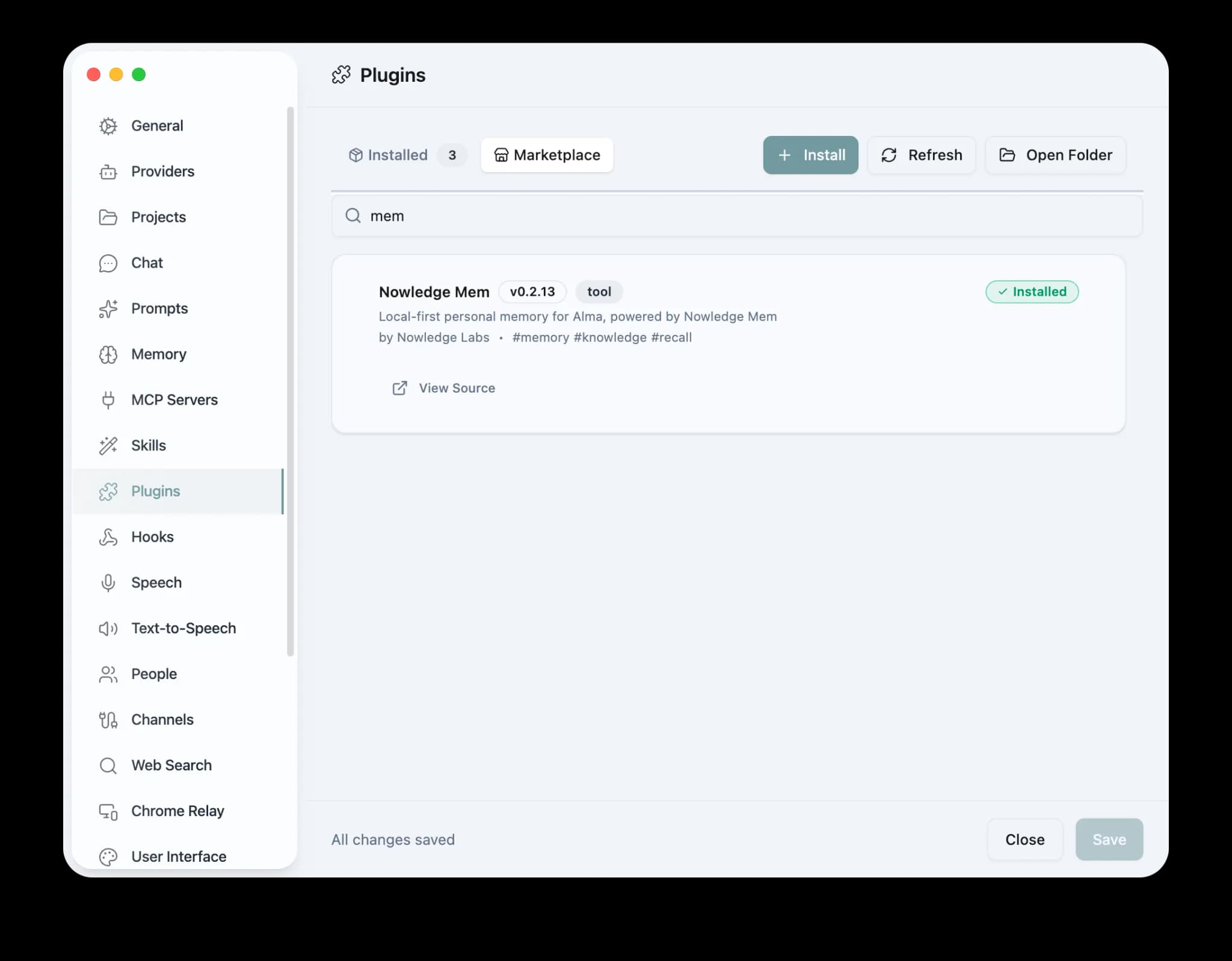
In Alma, open Settings → Plugins → Marketplace, search for Nowledge Mem, and click Install.
Optional: enable the Alma Skill
The plugin works without this step: tools, auto-recall, and thread sync are handled by the plugin. If you use Alma's Settings → Skills page, look for the bundled nowledge-mem Skill and enable it if it appears. It teaches Alma when to read Context Bundle, search prior work, inspect source threads, and save durable decisions.
If the Skill does not appear after installing the plugin, copy it into Alma's personal skills folder and refresh Skills:
mkdir -p ~/.config/alma/skills/nowledge-mem
cp ~/.config/alma/plugins/nowledge-mem/skills/nowledge-mem/SKILL.md \
  ~/.config/alma/skills/nowledge-mem/SKILL.md
Verify in a fresh thread
Ask Alma to run the status tool:
Use the Nowledge Mem status tool and tell me whether the server is connected.Then send one short normal message and wait a few seconds, switch threads, or quit Alma cleanly. The conversation should appear in Nowledge Mem under Threads with source alma.
Update
Open Settings → Plugins → Marketplace in Alma, find Nowledge Mem, and click Update if a newer version is available.
Disable or Uninstall
- To pause automatic thread capture without uninstalling, set
autoCaptureto off in the Nowledge Mem plugin settings. - To pause preloaded recall, set
recallPolicytooffor usestrict_toolswhen you only want explicit tool calls. - To remove the integration, disable or uninstall Nowledge Mem from Alma's Settings → Plugins page. If you installed a local copy manually, quit Alma and remove
~/.config/alma/plugins/nowledge-mem.
Customize Safely
Alma does not expose a separate package-owned override file for this plugin.
- Use Alma's plugin settings for durable behavior changes such as remote mode, recall policy, thread capture, and space selection
- If you want the agent to speak or save differently, use Alma's Skills, prompts, or instruction surfaces instead of patching plugin code
Do not edit installed plugin files just to keep a small preference. For the full host-by-host map, see Customize Integration Behavior.
What the Plugin Does
| Feature | Description |
|---|---|
| Auto-recall | Injects Working Memory + relevant memories on the first message of every thread |
| 13 tools | Memory: query, search, store, show, update, delete. Threads: search, show, create, delete. Plus Context Bundle, Working Memory, and status diagnostics |
| Access Anywhere | Connect to a remote Mem instance via API URL + API key in plugin settings |
| Live settings | Change API URL, API key, recall policy, or auto-capture. Takes effect immediately, no restart |
| Status diagnostics | nowledge_mem_status shows connection mode, server health, CLI availability, and current config |
| Live thread sync | Saves conversations after a few seconds of idle, on thread switch, and on quit (on by default) |
| Native Alma Skill | Optional nowledge-mem Skill for better tool-selection guidance in Alma's Skills surface |
| Local-first | Uses the Nowledge Mem API on this machine. No cloud required unless you enable Access Anywhere |
Thread Saving
Threads are saved automatically during normal use: the plugin syncs your conversation after a few seconds of idle, when you switch threads, or when you quit Alma. No action needed. Saved threads appear in the Nowledge Mem desktop app and can be distilled into structured memories later.
During conversation, the AI may also save specific insights or decisions as individual memories using the nowledge_mem_store tool. This happens when the conversation produces something durable, such as architecture decisions, debugging conclusions, preferences. For casual chat, the AI intentionally avoids saving noise.
If you want something specific remembered, just ask: "save this to memory."
Full-library backup (optional)
For a portable archive of every Alma thread, whether for a new Mem library, compliance, or a clean machine, use Alma Settings → Data → Export all threads. That produces alma-backup-*.zip with threads.json inside.
In Nowledge Mem, open Threads → Import → Import account history and pick the ZIP. Imported threads use the same alma source label as live plugin sync, so filters stay consistent. Other bulk formats and CLI options: Import existing conversations and Bulk import formats.
Access Anywhere
To connect to a remote Nowledge Mem instance:
- In Alma, open Settings → Plugins → Nowledge Mem
- Set API URL to your remote server (e.g.
https://mem.example.com) - Set API Key to your
nmem_...key - Changes take effect immediately. Use
nowledge_mem_statusto verify
The API key is read from Alma's plugin settings, sent as an Authorization: Bearer ... header, and never logged.
Spaces
Alma can keep one ambient memory lane per profile.
- Use
NMEM_SPACE="Research Agent"when you already launch Alma in one stable lane. - Or set
nowledgeMem.spacein Alma settings when one Alma profile always belongs to one lane. nowledgeMem.spaceTemplateis only for advanced setups where your launcher already exports a trustworthy lane variable, such as${ALMA_AGENT_NAME}.
If Alma does not know a real agent identity, stay on Default or use separate Alma profiles for separate lanes.
Related
- Connectors overview: native connectors, reusable packages, MCP, and browser capture
- Claude Code · Claude Desktop · Codex · OpenClaw · Raycast · Others